PPI vs. DPI: What's the Difference?
Estimated Reading Time: 7 minutes
If you've ever tried to prepare a photo for printing, you've probably seen the terms PPI and DPI thrown around.
A lot of people use them interchangeably. We hear “300 DPI” all the time at the lab, and we know exactly what someone means when they say it. Technically, though, PPI and DPI are describing two different things.
Understanding the difference can help you figure out how large your photo can actually be printed and, just as importantly, why changing a number in Photoshop doesn't magically make a file higher quality.
The Short Answer
PPI (Pixels Per Inch) describes your digital image.
DPI (Dots Per Inch) describes how a printer puts ink onto paper.
If you're trying to figure out how large you can print a photo, PPI is the one we're really concerned with.
What Is PPI?
PPI stands for Pixels Per Inch.
Every digital photo is made up of pixels. When we print that image, PPI tells us how many of those pixels are being used for every inch of the finished print.
Let's say you have an image that's 6,000 pixels wide.
- Print it 20 inches wide and you have 300 PPI.
- Print it 30 inches wide and you have 200 PPI.
- Print it 40 inches wide and you have 150 PPI.
The important thing here is that your original file never changed.
We're taking the exact same 6,000-pixel image and spreading those pixels across a larger or smaller print.
This is one of the first things we look at when someone sends us a file and asks, “How big can I print this?”
What Is DPI?
DPI stands for Dots Per Inch, and this is where things get mixed up.
DPI is really about the printer, not your photograph.
Our printers use microscopic droplets of ink to reproduce the colors and detail in your image. There isn't necessarily one dot of ink for every pixel in your photograph. The printer may use multiple droplets to reproduce the information contained in a single pixel.
So the easiest way to remember it is:
PPI is about your image.
DPI is about the printer.
For most photographers preparing files for us, PPI is far more useful to think about.
Why Does Everyone Say "300 DPI"?
Mostly because that's just what people have been saying for years.
We'll have photographers tell us they need their image to be “300 DPI,” and we know what they mean. They're really asking whether the file has enough resolution to produce a high-quality print at the size they want.
Technically, 300 PPI would be the more accurate term when talking about the image itself.
But we're not going to correct you at the counter if you call it DPI.
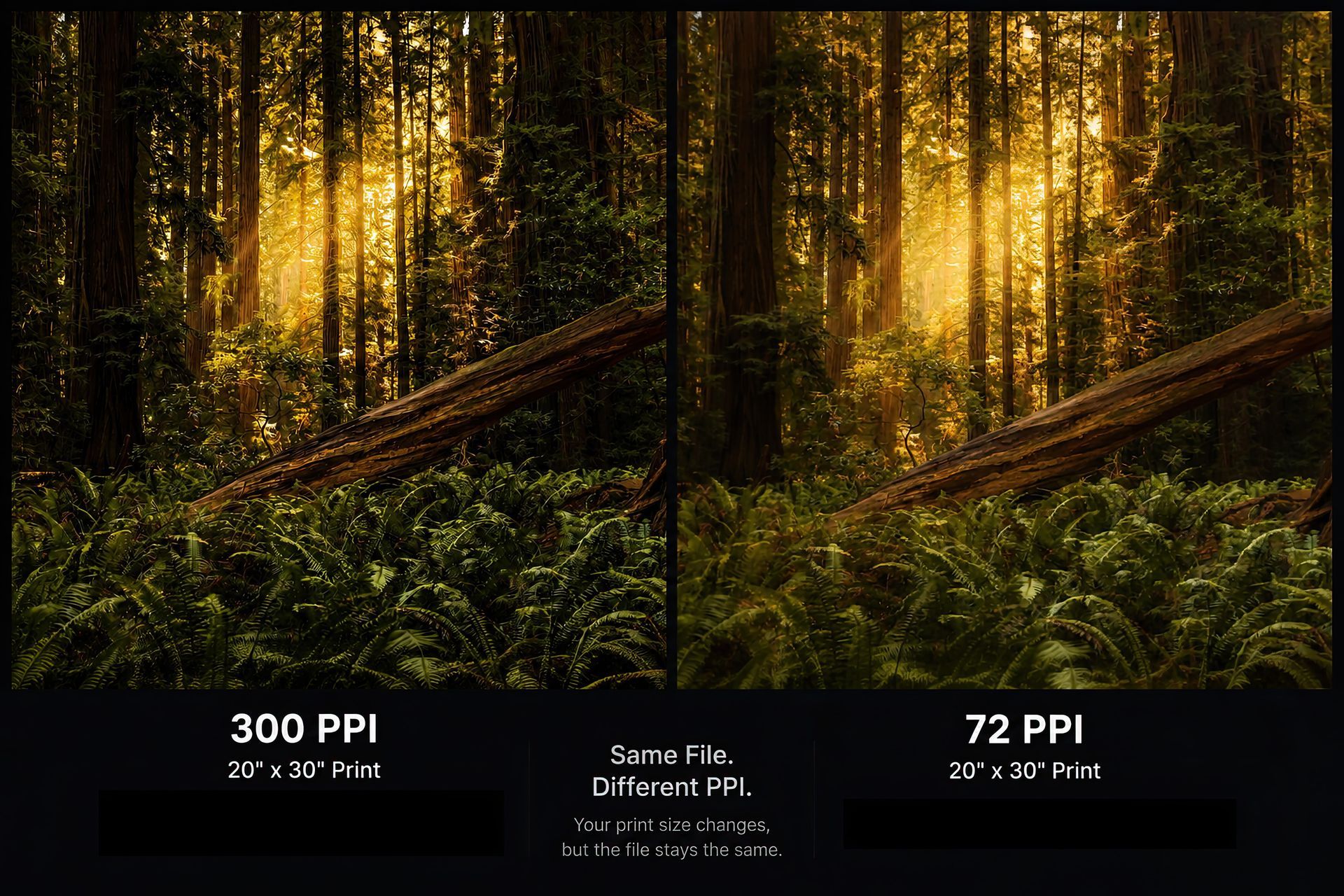
Does Changing 72 PPI to 300 PPI Improve My Photo?
No, and this is probably one of the biggest misconceptions we see when it comes to preparing files for print.
Let's say your image is 3,000 × 2,000 pixels.
If you open that file in Photoshop and change the resolution from 72 PPI to 300 PPI without resampling it, you still have exactly 3,000 × 2,000 pixels.
You didn't create any new detail.
All you've done is change the size at which the software expects those pixels to be printed.
This is why we don't reject an image just because the file information says “72 PPI.” We want to know the actual pixel dimensions and what size you're trying to print it.
Those numbers tell us much more about the file.
What Actually Determines Print Quality?
This is where I think people can get too hung up on the 300 PPI rule.
Resolution matters, but it's only part of what makes a good print.
We'd rather print a sharp, properly exposed image at 200 PPI than a soft or blurry image that technically comes in at 300 PPI.
When we're evaluating a file, we're also looking at things like:
- Focus
- Camera shake
- Motion blur
- Noise
- Compression
- Editing quality
- Viewing distance
- The final size of the print
A number by itself can't tell us whether a photograph is going to make a great print.
We have to look at the image.
Is 300 PPI Always Necessary?
No.
We love having 300 PPI when the file allows for it, especially for smaller prints that are going to be viewed up close. But we don't automatically tell someone they can't make a print because their file falls below 300 PPI.
As a general starting point:
- 300 PPI is excellent for close viewing and fine detail.
- 240 PPI is great for most photographic prints.
- 200 PPI can still produce a very good wall print.
- 150 PPI can work well for large artwork that's going to be viewed from farther away.
Viewing distance matters more than people sometimes realize.
If you're making a large piece for a wall, nobody is standing three inches away inspecting individual pixels. As the print gets larger, the normal viewing distance usually increases too.
That's one reason we're comfortable printing some large pieces below 300 PPI when the image itself supports it.
So What Should You Send Us?
Whenever possible, send us the original, full-resolution file from your camera or phone.
Don't resize it because you think we need a certain PPI. We'd much rather receive all of the information your camera captured and prepare the file appropriately for the final print.
We also recommend avoiding screenshots, images downloaded from Facebook or Instagram, or files that have been repeatedly saved and compressed.
When we review a file at Capture On Labs, we're looking at:
- Pixel dimensions
- Intended print size
- Image sharpness
- Cropping
- Overall file quality
We've seen files labeled 72 PPI that can produce beautiful prints.
We've also seen files labeled 300 PPI that aren't large enough for what the customer wants.
That's why we don't judge a file by that number alone.
Our Recommendation
Don't get too caught up in whether your file says 72 PPI or 300 PPI.
Keep your original file at its full resolution and send us the best version you have.
If you're not sure how large you can print it, that's something we can help with. David and our team can look at the actual file, consider how you're planning to display it, and recommend a size that makes sense for the image.
Sometimes that means staying smaller to preserve fine detail. Other times, especially with a piece that's going on a wall and viewed from several feet away, we may be comfortable going considerably larger.
The goal isn't to hit an arbitrary number.
The goal is to make a great print.
Frequently Asked Questions
Is PPI more important than DPI?
For photographers preparing digital images for print, yes. PPI tells us how much image information is available at a particular print size. DPI is a specification related to the printer itself.
Is 72 PPI only for screens?
No. That's an old misconception that's still floating around. Modern displays have all kinds of different pixel densities, and a file being labeled 72 PPI doesn't mean it's only suitable for a screen.
Can I make my image better by changing it to 300 PPI?
Simply changing the number won't improve the image. You would need to actually add pixels through resampling or AI enlargement, and even then, the quality of the original file still matters.
Is 200 PPI good enough for printing?
Absolutely, in many situations. We've printed plenty of larger pieces where 200 PPI is more than enough, especially when the finished artwork is meant to be viewed from several feet away.